Room B is still inaccessible, the partitions in room A are ready and two photos need saving before the work is covered. By the evening, this information must help the office prepare the next intervention.
A daily site report brings together completed work, attendance, blockers and follow-up actions. Here are the sections to include, a completed example and a downloadable template.
Download the free daily site report template (CSV) for Excel or LibreOffice. No registration is required. The completed example below shows how to fill in the fields.
Key takeaways
- A daily report records the date, weather, workforce, completed work, issues and useful photos.
- Complete it on the day, using fields that match what the office needs.
- Reusable templates avoid starting from a blank page.
- Link observations to photos, documents and the next action.
What is a daily site report?
It is a dated record of what happened on a construction site during one working day. It may be requested by the client or project team, or used internally to review progress, hours and issues.
Unlike weekly or monthly meeting minutes, the daily report is short, field-focused and written while details are fresh. Complete it before leaving the site, or at another safe point at the end of the working day.
Why does it matter?
The report serves four practical purposes:
- Project memory: it records progress, staffing, weather and decisions.
- A traceable record: dated observations and photos can help explain a later disagreement; they do not replace required formal notices.
- Field-to-office coordination: managers can see what moved forward and what needs attention.
- Consistency with timesheets: work records help the office review recorded hours and project costs.
A broad software feature list cannot compensate for reports that are missing or unclear. Start with a reporting routine people can maintain.
What should a daily report contain?
Project identification and context
- Project name or reference, date and author.
- Weather and any observed effect on work.
- People present, including subcontractors and visiting specialists where relevant.
Progress
- Work completed by package or zone.
- Significant deliveries or material use.
- Differences from the schedule and confirmed reasons.
Issues, defects and safety observations
- Observed incidents, near misses, defects or non-conformities.
- Comments raised on site by the client or project team.
- Corrective actions decided or still to be arranged.
Urgent safety matters must follow the site's immediate reporting procedure; do not wait for the daily report.
Photos and attachments
- A few located, captioned images explaining progress or a specific issue.
- References and versions for drawings or documents that changed.
Time entries, when relevant
- Arrival and departure times, or a link to the company's attendance record.
- Exceptional hours or other entries requiring review.
Adapt templates to the work: apartment renovation, an extension and roadworks may need different sections. Avoid duplicating detailed time records in every written observation.
Write a report in five steps
- Identify the day: project, date, author and teams present.
- Describe completed work: use zones, packages and known quantities.
- Record changes: distinguish the original plan, the observed difference and any unconfirmed explanation.
- Attach useful records: captioned photos, delivery details, instructions and issue references.
- Review and submit: name action owners and keep the report in the project record.
A completed example you can adapt
This fictional report can be copied into a document or spreadsheet.
| Section | Example |
|---|---|
| Project and date | Les Tilleuls residence — 2 November 2026 |
| Author | Team leader — partitioning package |
| Team present | 3 workers; detailed hours in the timesheet |
| Work completed | Partition frames installed in first-floor rooms A and B |
| Observed progress | Room A complete for this stage; room B to continue |
| Delivery | Tracks received and stored in the designated area |
| Difference or difficulty | Access to room C unavailable this morning |
| Follow-up | Construction manager to confirm access before the next intervention |
| Photos | Overall view of room A; detail of the remaining work |
| Submission | Report reviewed and filed in the project record |
Prepare reusable report templates, then find submissions in daily report tracking. Keep detailed attendance in time tracking.
Paper, spreadsheet or software?
| Approach | Strengths | What to watch |
|---|---|---|
| Paper or printed PDF | Familiar and readable on site | Office re-entry, separate photos and filing |
| Spreadsheet or document template | Adaptable using tools you may already have | Version control and links to time records |
| Shared construction software | Templates and related records in one place | Adoption of the submission and review workflow |
Follow one piece of information: who enters it, who checks it and who needs to find it later? Include the time spent transcribing voice messages in your comparison.
For the wider management routine, see our construction site tracking guide.
Mistakes that make reports harder to use
- Writing the report days later: times and reasons for delays become less precise.
- Omitting weather effects on exposed work: explain the observed impact instead of leaving a delay unexplained.
- Circulating several versions: agree which record is authoritative and how corrections are recorded.
- Photos without captions: identify the zone, date and observation.
- Separating work records from attendance checks: review inconsistencies before using hours for administration or cost analysis.
Habits that keep reporting useful
- Name one author per project and a replacement for absences.
- Aim for a short end-of-day entry; adjust the template if completing it becomes burdensome.
- Use common names for zones, work packages and issue types.
- File reports alongside the relevant drawings and project documents.
- Use daily facts to prepare weekly meeting records without copying every line.
On mobile, a short form, a captioned photo or reviewed voice input may be enough. The office still needs a consistent place to find the result.
What to check in reporting software
Test reusable templates, mobile entry, photo and document links, available exports, consistency with time tracking and historical access. Verify these capabilities in the actual plan you intend to use.
With Krewsite, the team selects a project and report template in WhatsApp, then completes the requested information. The office retrieves submissions in daily reports. Time entries remain separate so hours can be checked without repeating them in observations. The web application is available in French and English.
For other approaches, read our comparison of six construction reporting tools.
Frequently asked questions
How does a daily report differ from meeting minutes?
A daily report records one day's site activity. Meeting minutes formalise shared decisions from a project meeting. The daily record supplies detail that can inform those decisions.
Is a daily report compulsory?
Check the contract and project requirements. The expected documents and frequency vary. Even when no daily report is requested, an internal record can help organise work and explain changes.
How can the team complete it quickly?
Prepare essential fields, complete them on the day and use photos or reviewed voice input where helpful. Test the routine with the people who will submit and review it.
Can WhatsApp be used?
Yes, provided submissions are structured and filed with the project, date and information type. Guided Krewsite workflows connect field submissions to the office dashboard.
Test the template on a real working day
At the office, check whether you can locate the work, understand blockers and identify the next action. Adjust the fields with the author before reusing the template.
Explore WhatsApp report completion and report templates, or start a 15-day trial, with no card required and no automatic charge.
Download the daily report template
For trade-specific fields, use our HVAC intervention report example or the insulation record before covering work.
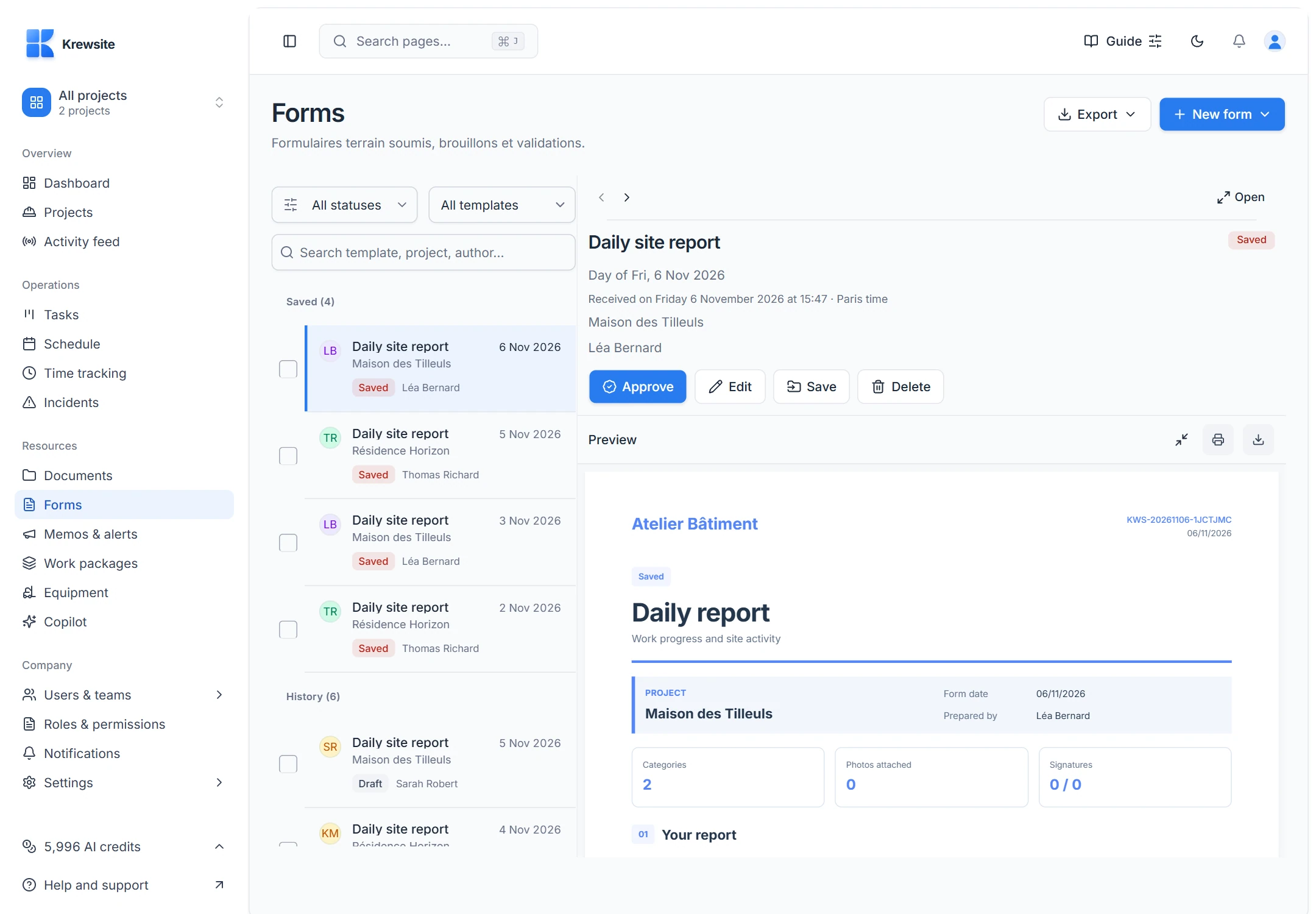
Demonstration of the interface. Adapt the template fields to the observations required on your project.
Download the blank daily construction report (CSV). Open it in Excel or LibreOffice and adapt its sections to your project.
